Recurring Revenue
Overview
Section titled “Overview”Recurring Revenue reports opportunity, contracted service and billing measures separately. It preserves currency separation and distinguishes service-period forecasts from expected bookings and actual invoice/payment records.
Purpose
Section titled “Purpose”Use the dashboard for sales and renewal planning. It is a management projection, not an accounting revenue-recognition engine.
Prerequisites
Section titled “Prerequisites”-
The user has Revenue Analytics view permission and access to relevant source records. CSV export requires the applicable export grants.
-
Revenue plans or agreements must be configured before the dashboard can show their forecasts.
Procedure
Section titled “Procedure”-
Open Sales > Recurring Revenue. Choose Forecast start and Horizon (3, 6, 12, 24 or 36 months), or enter Custom end (exclusive).
-
Set Currency and Group by Month, Quarter or Year. Refine Owner, Team, Customer, Pipeline, Deal stage and Contract status.
-
Review Billing and renewal work and the separate currency metric blocks. Renewal and pending-run counts use the next 30 days; invoice counts follow the selected range.
-
In Service-period revenue forecast, select Chart sources and Chart measure. Sources include qualified Leads, pipeline, booked and contracted pools; measures include potential, weighted, recurring and one-time.
-
Compare Expected bookings with Scheduled billing. Open a Forecast source link to examine its plan and service dates.
-
Select Export forecast CSV when authorized. Preserve the selected dates, filters and currency when sharing the result.
Expected result
Section titled “Expected result”The dashboard recalculates the scoped forecast and operational measures for the selected period, keeping distinct business timelines visible.
Screenshots and diagrams
Section titled “Screenshots and diagrams”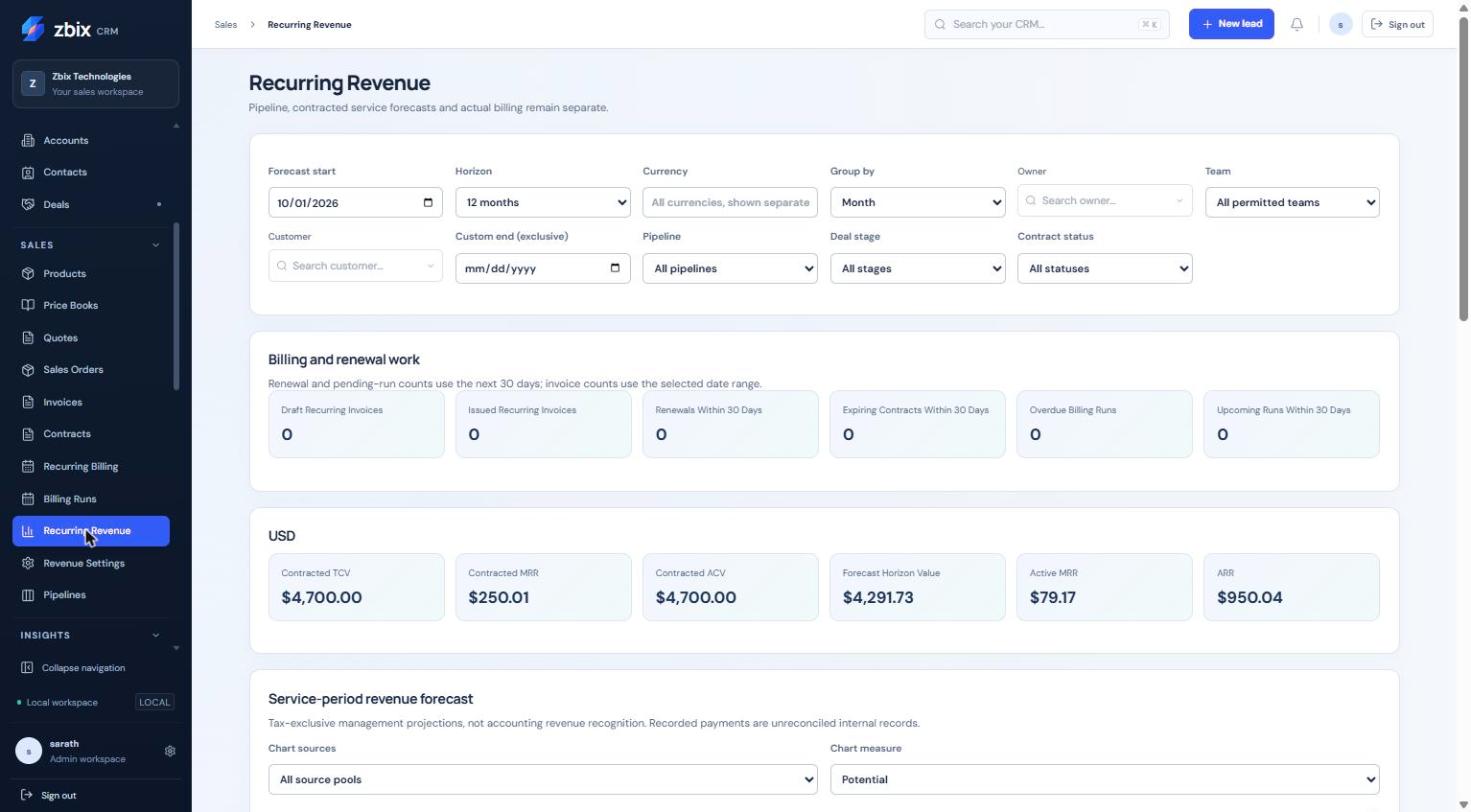
Important notes
Section titled “Important notes”-
Opportunity expected-close dates control bookings; service start/end dates control service projections; scheduled invoice dates control billing.
-
Deal Amount follows the revenue plan’s TCV and weighting follows configured stage probability. Qualified Lead potential requires both Qualified Lead status and Qualified estimate confidence.
-
Forecast figures are tax-exclusive after discounts; scheduled invoice charges are tax-inclusive. Do not compare them as equivalent amounts.
-
An ongoing agreement has no fixed lifetime TCV; a bounded forecast is not a commitment for an unlimited term.
-
Recorded payments are unreconciled internal records. Do not present the dashboard as bank-reconciled collections.
Troubleshooting
Section titled “Troubleshooting”-
No forecast appears: review source plans, period, currency, record permissions and the Lead qualification/confidence conditions.
-
Forecast differs from invoice totals: compare tax treatment, service periods, billing dates and source pools before treating the difference as an error.
-
A Deal amount cannot be edited independently: change the allowed revenue plan rather than bypassing its managed TCV.
Related articles
Section titled “Related articles”Search the guides or talk to the ZBIX team.


Software products, application engineering and IT services from Zbix Technologies.
Visit our company website ↗