API validation and safe concurrency
Overview
Section titled “Overview”The application validates data both at request boundaries and in domain services. Records carry versions, and mutations can reject stale versions rather than overwrite another user’s change. Relationships must refer to accessible records of the expected type in the same organization. Commercial status transitions apply additional rules beyond ordinary field validation.
Purpose
Section titled “Purpose”Use this reference to resolve rejected forms and design clients that preserve user intent when data changes concurrently.
Prerequisites
Section titled “Prerequisites”-
The current record or operation response and its version.
-
Permission for the requested action and accessible related records.
Procedure
Section titled “Procedure”-
Read the latest record before editing and keep its version with the proposed change. Submit only supported fields.
-
Validate names, email addresses, dates, amounts and required stage fields before submission. Treat the server’s detailed field response as authoritative.
-
If the server reports that the record changed, reload it, compare the new state and reapply only the intended changes. Do not repeatedly resend the stale body.
-
For an operation with an idempotency key, retain the key for a retry of the same request. Never reuse it for changed content.
-
After a successful action, inspect the returned state and history. A saved field value does not prove a subsequent worker or provider operation completed.
Expected result
Section titled “Expected result”The client handles invalid data, concurrent changes and retries without silently duplicating business effects.
Screenshots and diagrams
Section titled “Screenshots and diagrams”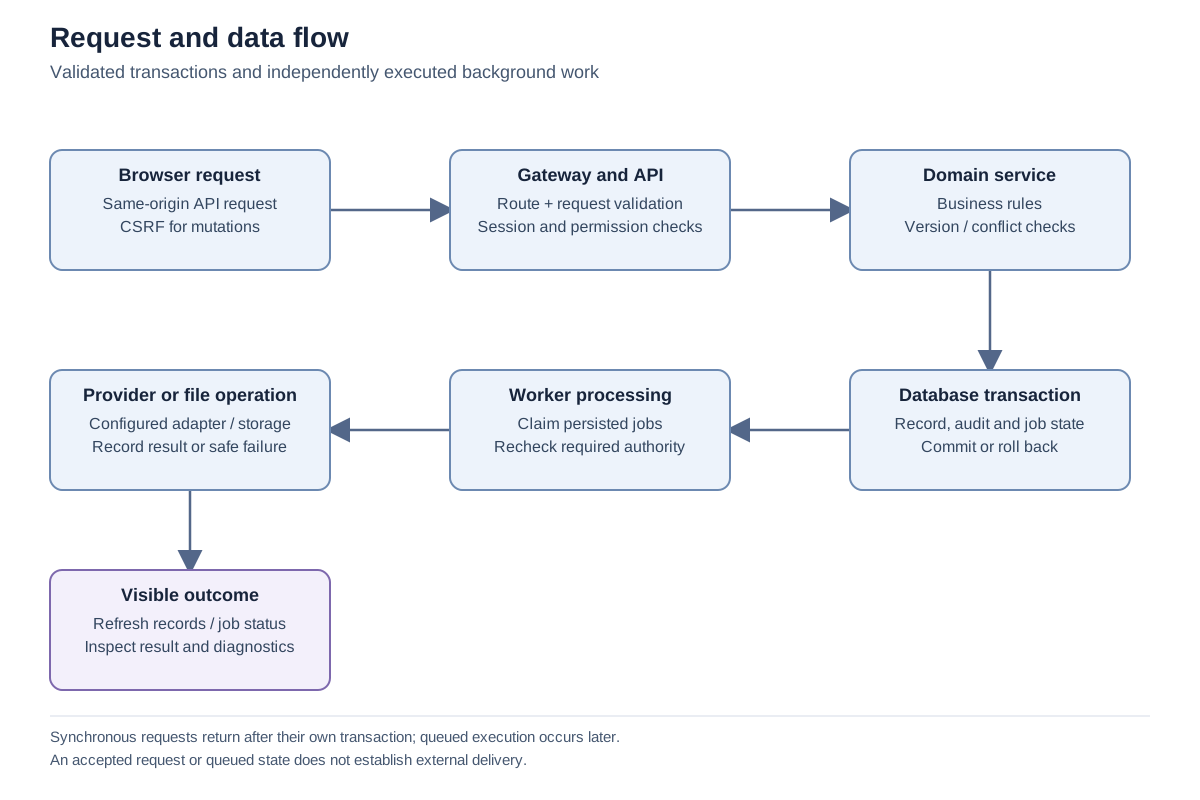
Important notes
Section titled “Important notes”-
Core names are required and limited to 200 characters. Email validation is bounded, money must be finite and nonnegative, and currencies use three uppercase letters at the core record layer.
-
Lead and Contact email deduplication is case-insensitive within the module and organization; Product codes also have duplicate protection.
-
Meeting end time must follow start time. Calendar operations also validate timezone behavior.
-
An integration endpoint supports only its published operations; browser endpoints are not automatically available through a bearer credential.
Troubleshooting
Section titled “Troubleshooting”-
Conflict after a double click: inspect the current operation result before creating another record.
-
A relationship fails validation: confirm account/contact/deal consistency and current visibility instead of substituting a hidden record identifier.
Related articles
Section titled “Related articles”Search the guides or talk to the ZBIX team.


Software products, application engineering and IT services from Zbix Technologies.
Visit our company website ↗