Manage sessions and sign out other devices
Overview
Section titled “Overview”Sessions have both an inactivity limit and an absolute maximum lifetime. The v1.2.0 defaults are 30 minutes of inactivity, 12 hours of normal lifetime and 30 days for Remember me. Installations can configure these values within bounded ranges. Remember me does not disable the inactivity check. The Active sessions panel shows last activity and maximum expiry for each session.
Purpose
Section titled “Purpose”Use session controls after a lost device, a shared-browser session or an account access review.
Prerequisites
Section titled “Prerequisites”-
An authenticated account for personal session management.
-
Administrator identity for revoking another user’s sessions.
Procedure
Section titled “Procedure”-
Open Settings and locate Active sessions. Review This device and each Other session by last active time and maximum expiry.
-
Choose Revoke beside a specific other session, or choose Sign out other devices to retain the current session while ending the others.
-
Refresh the panel and verify the revoked entries are removed. The other browser will need to authenticate again on its next protected request.
-
For another user, open that user’s administration record and use Revoke active sessions. Verify the user identity before confirming the action.
-
When rotating a password, sign in again afterward. Password changes invalidate existing sessions rather than silently keeping them authenticated.
Expected result
Section titled “Expected result”Only the intended remaining sessions retain access, and subsequent requests from revoked sessions require sign-in.
Screenshots and diagrams
Section titled “Screenshots and diagrams”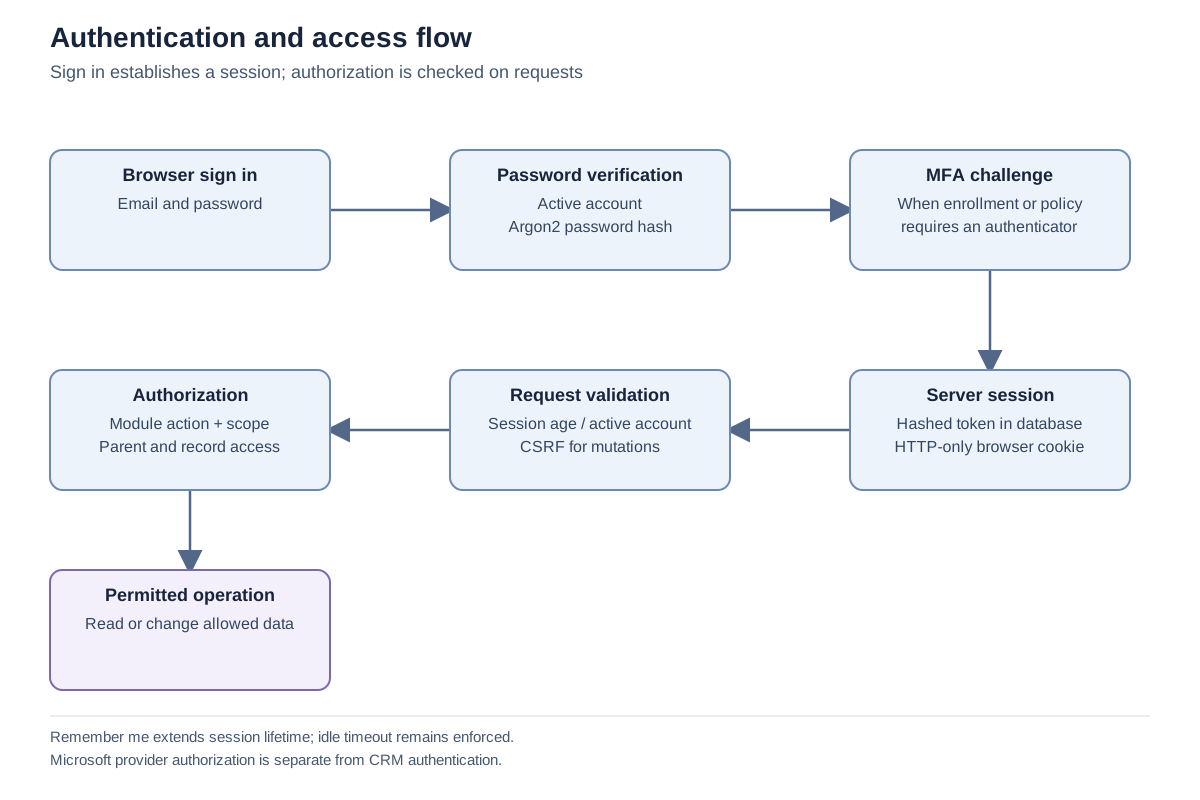
Important notes
Section titled “Important notes”-
The list identifies sessions by time and current-device status; it is not a complete device inventory or geolocation history.
-
The server updates last-seen time periodically rather than on every request.
-
Normal lifetime is configurable from 1 to 168 hours; Remember me from 1 to 90 days; inactivity from 5 to 1,440 minutes. Use the installation’s approved policy rather than assuming defaults.
-
An administrator cannot use the other-user endpoint for their own session; personal controls cover that case.
Troubleshooting
Section titled “Troubleshooting”-
A session returns after revocation: confirm whether the user signed in again, creating a new session.
-
A user still sees a cached page: access is enforced on the next protected server request, so refresh and verify the action rather than relying on already displayed text.
Related articles
Section titled “Related articles”Search the guides or talk to the ZBIX team.


Software products, application engineering and IT services from Zbix Technologies.
Visit our company website ↗