Set up authenticator protection
Overview
Section titled “Overview”Security Settings manages personal authenticator enrollment and recovery codes. Administrators can configure an organization MFA policy and assist another user with recovery under the required verification controls.
Purpose
Section titled “Purpose”Add a second sign-in factor and retain a controlled recovery path.
Prerequisites
Section titled “Prerequisites”-
Your current CRM password.
-
An authenticator application and a protected place for one-use recovery codes.
-
Administrator identity for organization policy or administrator-assisted recovery.
Procedure
Section titled “Procedure”-
Open Security Settings and choose Set up authenticator app.
-
Reauthenticate as prompted. Scan the displayed QR code in your authenticator and submit a current code to confirm enrollment.
-
Save the displayed recovery codes in your approved protected location. They are shown only through the designated recovery-code flow.
-
Sign out and sign in again to verify the challenge works.
-
Administrators should check that the affected active users are enrolled before changing the organization policy to require MFA.
-
For a lost factor, use an unused recovery code or contact another administrator. Administrator-assisted reset revokes sessions and requires reenrollment.
Expected result
Section titled “Expected result”The account has verified authenticator protection and a known recovery route.
Screenshots and diagrams
Section titled “Screenshots and diagrams”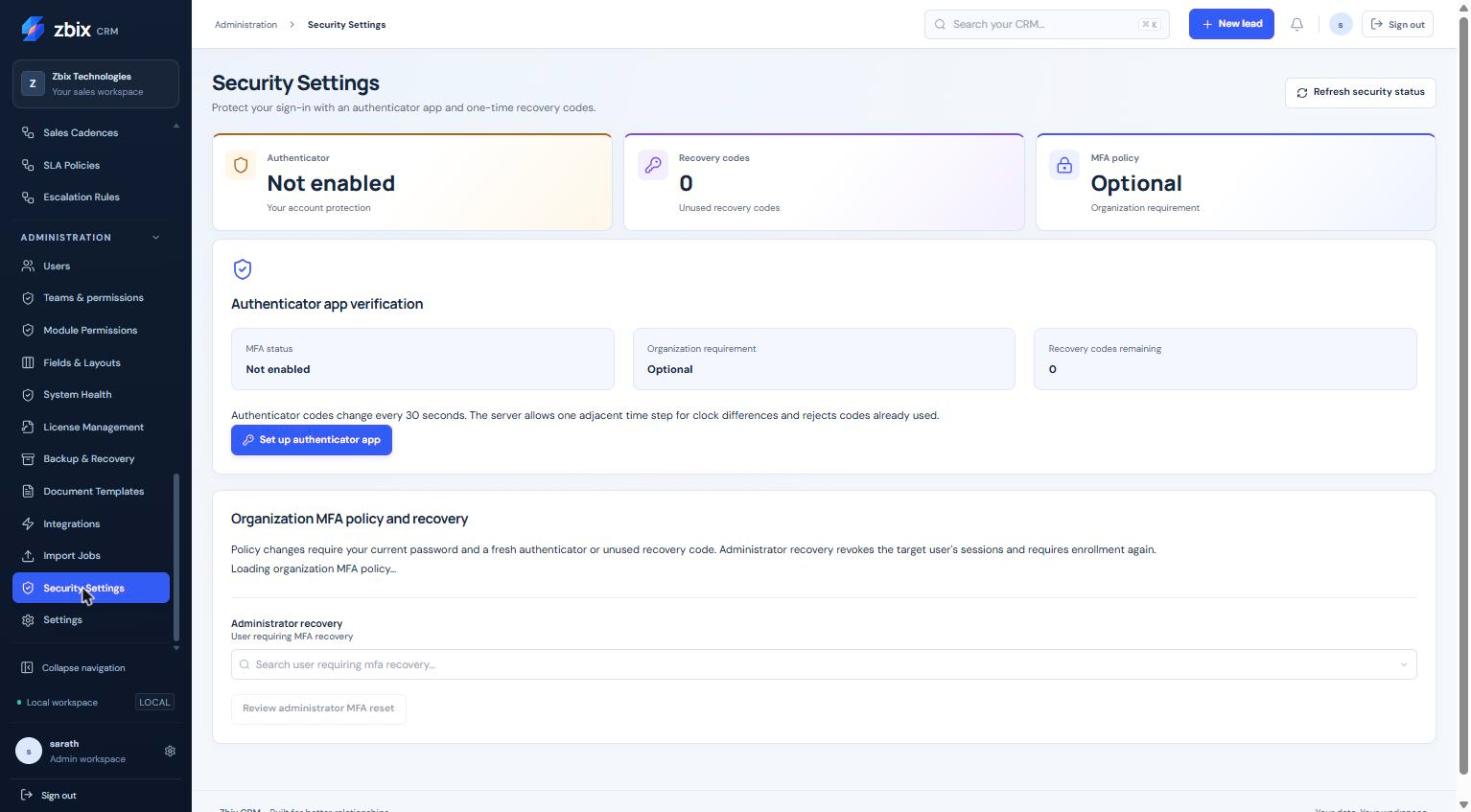
Important notes
Section titled “Important notes”-
Never place QR codes, setup secrets or recovery codes in a support ticket or screenshot.
-
Authenticator codes change on a short time interval. Already-used codes are rejected and adjacent clock steps are bounded.
-
Personal MFA enrollment and an organization requirement are separate states.
-
The screenshot shows a not-enabled example; it does not establish your current policy.
Troubleshooting
Section titled “Troubleshooting”-
Code rejected: use a fresh code and check the device clock.
-
Policy change blocked: complete the enrollment prerequisites for affected users.
-
Recovery required: do not share a code with support; follow the authenticated recovery flow.
Related articles
Section titled “Related articles”Search the guides or talk to the ZBIX team.


Software products, application engineering and IT services from Zbix Technologies.
Visit our company website ↗