Install Zbix CRM on Ubuntu
Overview
Section titled “Overview”The Linux server package installs a self-hosted CRM stack from bundled, versioned container images. The package creates protected configuration and persistent storage, registers a systemd service, applies the release migrations and checks readiness. Host Docker and the public HTTPS gateway are prepared separately.
Purpose
Section titled “Purpose”Install the approved Linux release on a new qualified Ubuntu amd64 host and complete the operational checks required before users begin work.
Prerequisites
Section titled “Prerequisites”-
A new approved Ubuntu amd64 target that meets the Linux requirements, with sudo access.
-
Docker Engine and Compose v2 available; free loopback port 8088.
-
The approved Linux archive, independently obtained SHA256 and matching release manifest.
-
An approved hostname, HTTPS plan, initial administrator and license/recovery arrangements.
Procedure
Section titled “Procedure”-
Verify the archive name and outer SHA256 against the publisher’s approved release information before extraction. For release 1.2.0 the archive is ZBIX-CRM-Server-1.2.0-20261027-linux-x64.tar.gz. A matching filename alone does not establish integrity.
-
Extract the archive to a staging directory and open its manifest.json and image-lock.tsv. Confirm the expected release and source identity. Run the inner checksum verification from the extracted package root and resolve every mismatch before continuing.
-
Complete the host preflight: Ubuntu amd64, Docker Engine, Compose v2, available memory and disk, and an unused TCP 8088. Review the release-specific hostname configuration with the implementation owner; customer-domain adaptation must cover the gateway, application origin and trusted host settings.
-
On this new authorized target, run sudo ./bin/zbix-crm install from the extracted package. The installer rejects an existing installation. It loads or verifies the exact bundled image identities, creates the installation directories, generates protected local configuration and a separate recovery key, writes the versioned release and registers systemd.
-
Wait for the installer’s readiness result. Run sudo zbix-crm status and sudo zbix-crm version. Compare the version and migration with the approved manifest; the v1.2 release specifies 0033_record_list_performance. Check the local readiness endpoint before exposing browser access.
-
Run sudo zbix-crm bootstrap-admin —email admin@example.com, substituting the approved administrator address. Enter the password at the hidden prompt. Bootstrap authorization is local/root-only, lasts one hour after installation and is consumed after success. If it expires, an authorized local operator can use bootstrap-renew.
-
Complete the separately reviewed host Nginx and certificate procedure for the approved domain. Verify trusted HTTPS, the expected browser name, HTTP-to-HTTPS behavior, certificate renewal and private database/API exposure. The application package does not automatically qualify a new customer DNS or TLS configuration.
-
Sign in through HTTPS, review License Management, enroll the appropriate administrators in MFA and complete the security handover. Create a recovery point, verify it independently and run an isolated restore test. Record monitoring ownership and outstanding qualifications before onboarding business records.
Run from the verified extracted package on a new authorized host
sha256sum -c checksums.sha256sudo ./bin/zbix-crm installsudo zbix-crm statussudo zbix-crm versionLocal readiness and administrator bootstrap; replace the example email
curl -fsS http://127.0.0.1:8088/api/readysudo zbix-crm bootstrap-admin --email admin@example.comExpected result
Section titled “Expected result”The installed services are healthy, release and schema identity match the approved package, browser access uses trusted HTTPS, and administrator, license and recovery handover are documented.
Screenshots and diagrams
Section titled “Screenshots and diagrams”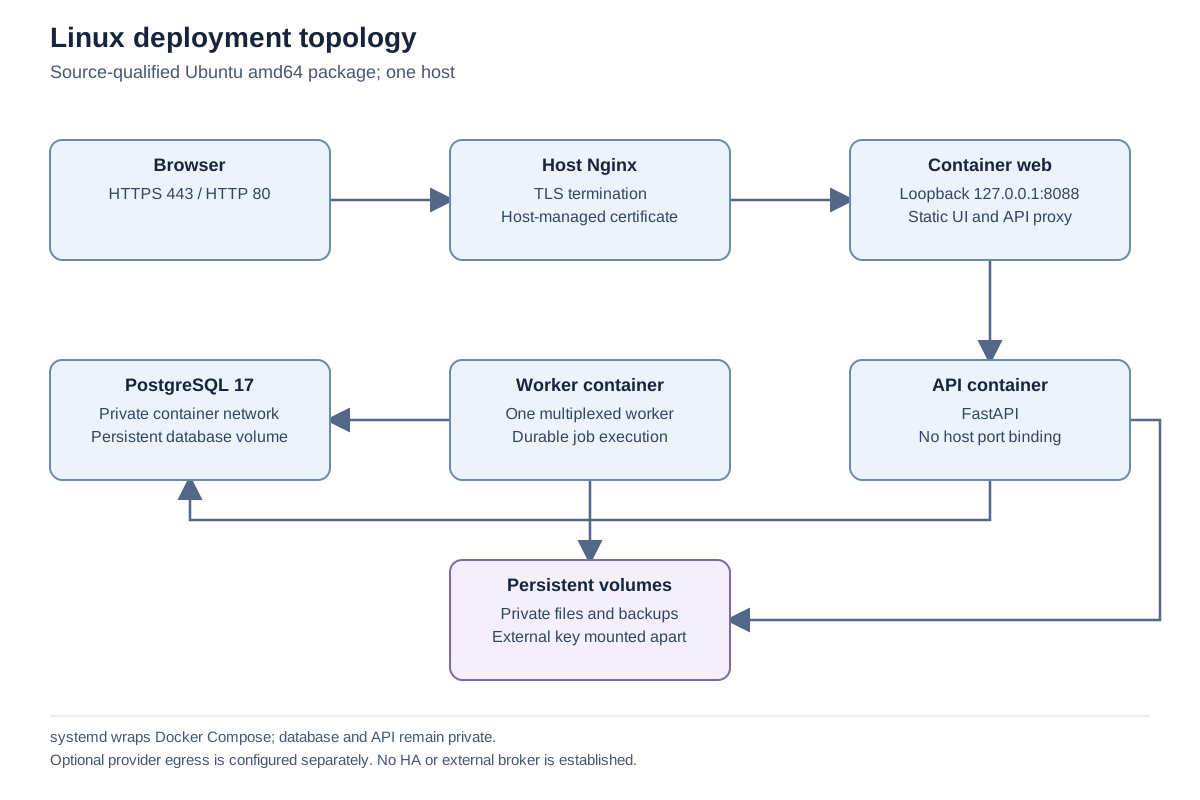
Important notes
Section titled “Important notes”-
Installation performs database initialization and forward migrations. Use this procedure only on the approved target; use the upgrade procedure for an existing installation.
-
Persistent directories are /opt/zbix-crm, /etc/zbix-crm and /var/lib/zbix-crm. Preserve configuration, private files, database storage and separately held recovery secrets.
-
The offline archive contains application images; it does not bundle Docker, host Nginx or Certbot.
-
These steps were reviewed against source. No fresh installer or migration was executed for this documentation.
Troubleshooting
Section titled “Troubleshooting”-
For a failed checksum or image identity check, obtain a clean approved package. Do not edit the manifest to accept unexpected bytes.
-
If readiness fails, inspect status and bounded API/worker logs, then check database readiness and storage. Preserve the diagnostic evidence and avoid deleting volumes as a repair step.
-
If bootstrap reports expiration or prior consumption, resolve the local authorization state with the installation owner. Do not create a public bootstrap endpoint.
-
Escalate with package version, expected schema, failed step and sanitized diagnostic output. Exclude configuration values and keys.
Related articles
Section titled “Related articles”Search the guides or talk to the ZBIX team.


Software products, application engineering and IT services from Zbix Technologies.
Visit our company website ↗