Test a recovery point in isolation
Overview
Section titled “Overview”Test restore rehearses database and private-file recovery in a separate temporary target. The runtime compares recovered table counts and file hashes and records a receipt. It does not replace the running CRM database or start external integrations.
Purpose
Section titled “Purpose”Establish that an integrity-verified point can be recovered by the implemented isolated test before relying on it for an upgrade or recovery plan.
Prerequisites
Section titled “Prerequisites”-
Explicit test restore permission or authorized recovery-operator access; ordinary administrator defaults do not grant this action.
-
An integrity-verified recovery point and access to its correct key and destination.
-
Sufficient capacity and database privileges for a separate temporary restore target.
Procedure
Section titled “Procedure”-
Open Administration > Backup & Recovery > Recovery Center. Read the displayed recovery scope, impact and required credentials before choosing an artifact.
-
Select the point whose identity and verification receipt match the approved change or recovery record. Confirm integrity verification has succeeded.
-
Choose Test restore and monitor the Test restore operation in History. Do not interpret a queued request as a successful rehearsal.
-
Allow the worker to create its isolated database and file area, restore the point and compare recorded counts and hashes. The operation also checks supported migration and licensing-installation metadata.
-
Review the completed result and artifact verification state. Record the restore-test time, artifact identity and receipt with the recovery plan.
-
If the rehearsal fails, preserve the last known usable recovery point and resolve the failure before an upgrade or destructive maintenance decision.
Linux package alternative; requires a verified artifact and authorized restore access
sudo zbix-crm test-restore --email admin@example.com --artifact-id APPROVED_ARTIFACT_IDExpected result
Section titled “Expected result”The selected artifact is marked restore tested after a successful isolated rehearsal with a persisted result.
Screenshots and diagrams
Section titled “Screenshots and diagrams”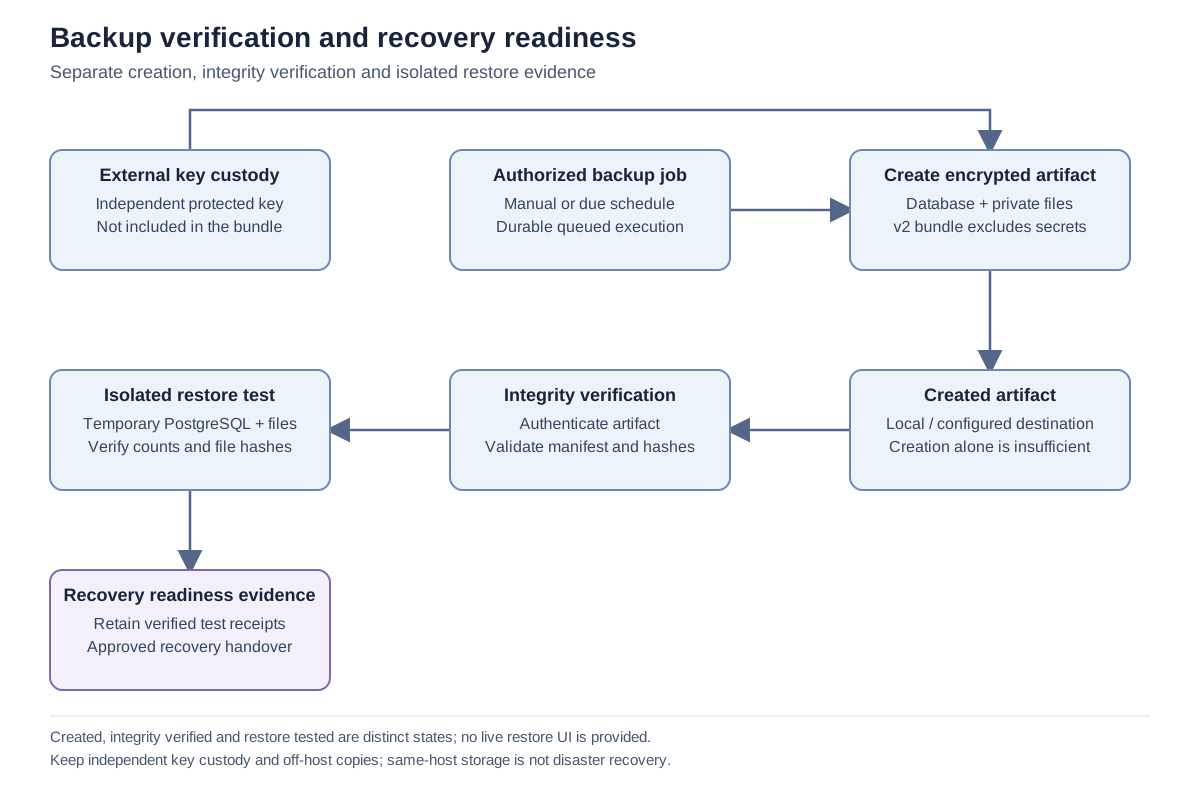
Important notes
Section titled “Important notes”-
This test validates the implemented database/file restore checks. It is not a full user-acceptance exercise, an external integration test or a production RTO guarantee.
-
No live restore button is provided. Production recovery requires an independently reviewed operator procedure and authorization.
-
The runtime cleans up only its owned temporary target. Do not manually remove another database or storage area while investigating a failed test.
Troubleshooting
Section titled “Troubleshooting”-
If the operation is denied, review the dedicated restore permission with the recovery administrator.
-
If it reports that verification is required, complete the independent verification for that exact artifact.
-
For schema, file or database errors, preserve the receipt and involve the recovery owner. Record package/schema identities without including credentials.
Related articles
Section titled “Related articles”Search the guides or talk to the ZBIX team.


Software products, application engineering and IT services from Zbix Technologies.
Visit our company website ↗