Prepare backup access keys and storage
Overview
Section titled “Overview”Recovery operations need more than access to the Backup & Recovery page. The installation needs a working worker, protected storage, an independently recoverable encryption key and the specific permissions for each action.
Purpose
Section titled “Purpose”Prepare recovery operations without assuming that administrator status grants every backup privilege.
Prerequisites
Section titled “Prerequisites”-
A named backup operator and an independent recovery/key custodian.
-
An approved storage destination and enough capacity for staging, verification and isolated restore work.
-
An authorized plan for protecting all external secrets required to recover the installation.
Procedure
Section titled “Procedure”-
Review the user’s effective backup permissions. Default administrators can view the dashboard and history, manage schedules, start manual backups and verify artifacts. Destination management, artifact download and test restore require the appropriate explicit grant or recovery-operator authorization.
-
Confirm PostgreSQL, the private-file store and the worker are healthy. A ready API does not prove that the worker can execute queued recovery jobs.
-
Have the deployment operator configure the backup encryption key securely outside the artifact. Record its custody and recovery procedure without copying the value into an article, ticket or screenshot.
-
Protect the additional external secrets required by the installation. The v2 artifact records that these are required but intentionally excludes secret values.
-
Create or select an approved destination and validate it in Storage. For remote storage, confirm the approved credential reference and TLS configuration through the deployment operator.
-
Check capacity and arrange an isolated restore target. Define who reviews verification and restore receipts and who responds to backup failure alerts.
-
Run a manual recovery-point cycle before enabling a recurring schedule. Keep the schedule paused until creation, integrity verification and isolated restore testing succeed.
Expected result
Section titled “Expected result”The authorized operator can create a recovery point and the recovery owner can independently verify and rehearse recovery with the required keys and storage.
Screenshots and diagrams
Section titled “Screenshots and diagrams”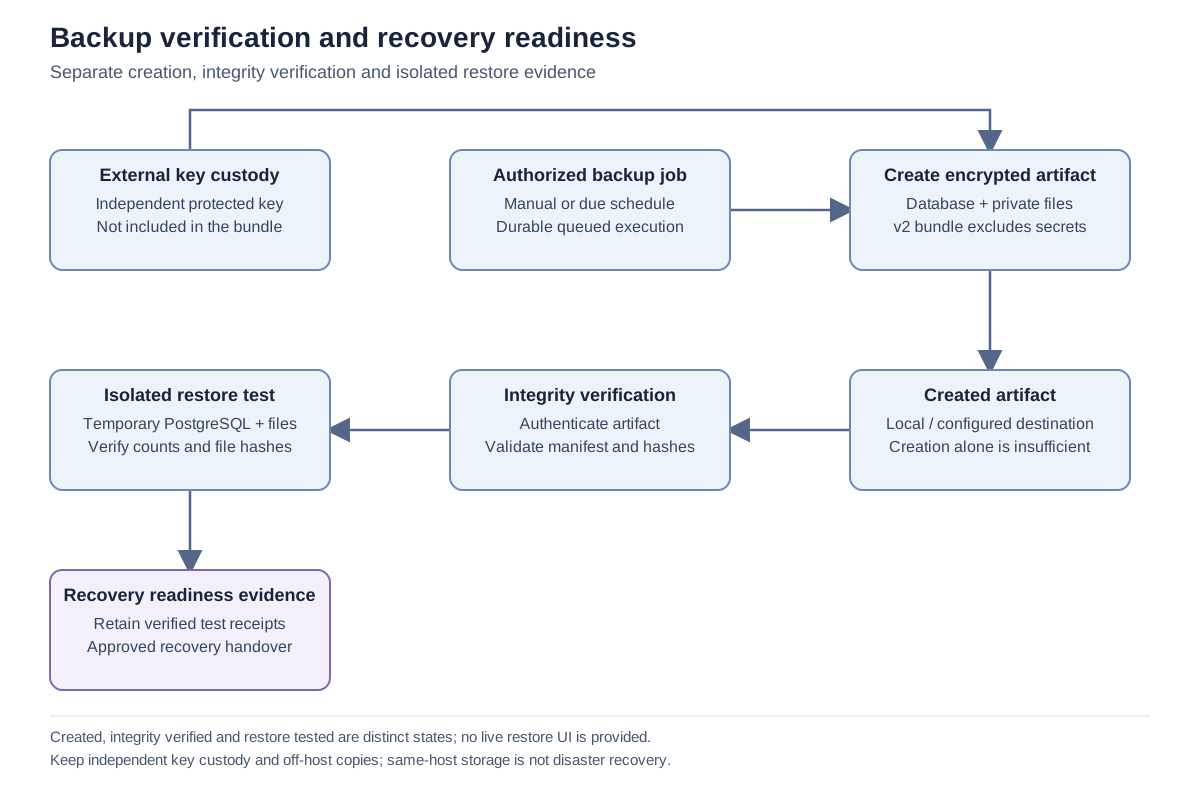
Important notes
Section titled “Important notes”-
Read, download, destination management and restore permissions are separate. A visible button does not override a server-side permission check.
-
The recovery key is not a substitute for the application’s other durable encryption keys.
-
Use an approved off-host destination and separate key custody to protect against host loss. A same-host destination alone is insufficient.
Troubleshooting
Section titled “Troubleshooting”-
For permission denied, ask the authorized recovery administrator to review the specific requested operation; do not broaden unrelated CRM permissions.
-
For missing-key or destination errors, correct server-side configuration through the deployment operator and then validate again.
-
Escalate with the operation, job identifier, error code and time. Do not send key values or raw environment files.
Related articles
Section titled “Related articles”Search the guides or talk to the ZBIX team.


Software products, application engineering and IT services from Zbix Technologies.
Visit our company website ↗