CRM and commercial data relationships
Overview
Section titled “Overview”Accounts represent organizations; Contacts represent people and may refer to Accounts. Deals may link an Account and primary Contact. Quotes may link those records and a Deal, with currency and relationship consistency enforced. A qualified Lead can be converted into a new or existing Account and Contact, with an optional Deal. Conversion records the resulting identities and preserves the original Lead as Converted.
Purpose
Section titled “Purpose”Use the relationship model to prepare clean data, resolve lookup errors and understand the path from qualification to invoicing.
Prerequisites
Section titled “Prerequisites”-
View access to related records and the appropriate create or edit permissions.
-
A qualified Lead for conversion, or a valid sales document source for commercial conversion.
Procedure
Section titled “Procedure”-
Search for an existing Account before creating another organization record. When converting a Lead, select the existing Account if a matching company already exists.
-
Select a Contact associated with the chosen Account. If linking an existing Deal during conversion, its Account and primary Contact must match and the Deal must remain open.
-
Keep Quote currency and relationships consistent with the linked Deal. Review the current accepted quotation revision before converting it to a Sales Order.
-
Confirm a Sales Order before creating its Invoice. The Invoice inherits its commercial snapshot rather than recalculating prices from the current product catalog.
-
Use the associated history and revision selector when reviewing prior terms. Preserve source references instead of recreating historical documents as ordinary records.
Expected result
Section titled “Expected result”Related records form a consistent customer and sales history, and commercial documents retain the terms approved at the relevant stage.
Screenshots and diagrams
Section titled “Screenshots and diagrams”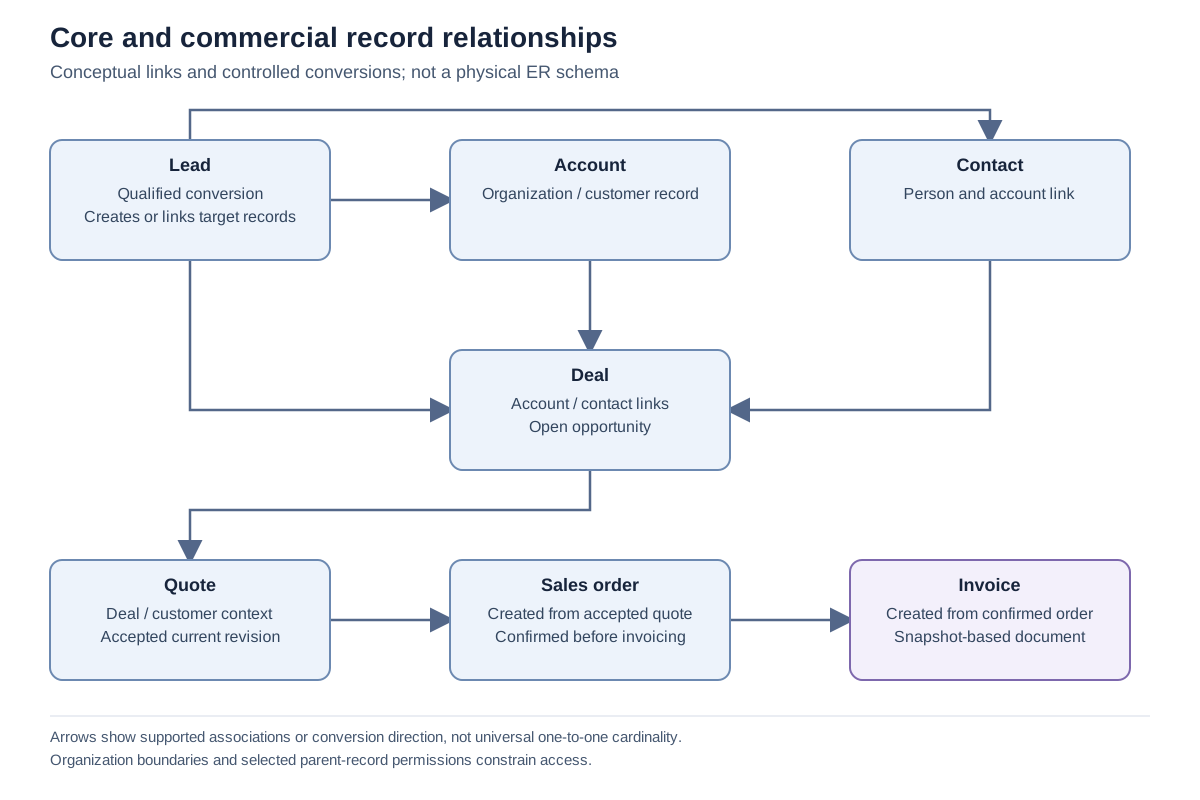
Important notes
Section titled “Important notes”-
Converted Leads cannot be edited through ordinary record updates. Conversion retries return the stored conversion result.
-
Existing records selected during Lead conversion are linked; conversion does not silently replace their field values.
-
An order from an accepted quotation snapshot is financially immutable. Amend through a new quotation revision.
-
A source Sales Order has one Invoice relationship in this implementation, including when that invoice is later voided.
Troubleshooting
Section titled “Troubleshooting”-
A Contact lookup or save fails: verify that it belongs to the selected Account and is visible to the current user.
-
Quote conversion is unavailable: ensure the selected revision is the current Accepted revision and that Sales Order create permission is granted.
Related articles
Section titled “Related articles”Search the guides or talk to the ZBIX team.


Software products, application engineering and IT services from Zbix Technologies.
Visit our company website ↗