Authentication and sign in architecture
Overview
Section titled “Overview”CRM login uses an email address and password, with an additional authenticator or recovery-code challenge when MFA is enabled. Passwords are verified with Argon2. Successful authentication creates a server-side session and an HTTP-only browser cookie. The database stores a hash of the session token. Microsoft 365 connection authorizes mailbox/calendar access and does not replace this CRM sign-in flow.
Purpose
Section titled “Purpose”Use this reference to understand login, enrollment requirements and the relationship between application identity and provider connections.
Prerequisites
Section titled “Prerequisites”-
An active CRM user account.
-
The enrolled authenticator or an unused recovery code when the account requires MFA.
Procedure
Section titled “Procedure”-
Open the approved CRM URL and enter the account email and password. Use Remember me only on a trusted personal device when offered.
-
If an MFA challenge appears, enter a current authenticator code or an unused recovery code. A password-only success does not complete a required MFA challenge.
-
If enrollment is required, complete Security Settings enrollment before expecting normal protected operations to become available.
-
After signing in, confirm the expected account and workspace. Navigation is based on current effective permissions and enabled capabilities.
-
Use Sign out when finished on a shared device. If access is suspected on another device, revoke that session using the session controls.
Expected result
Section titled “Expected result”A valid authenticated session is established, subject to the organization’s MFA policy, user activity and server-side lifetime limits.
Screenshots and diagrams
Section titled “Screenshots and diagrams”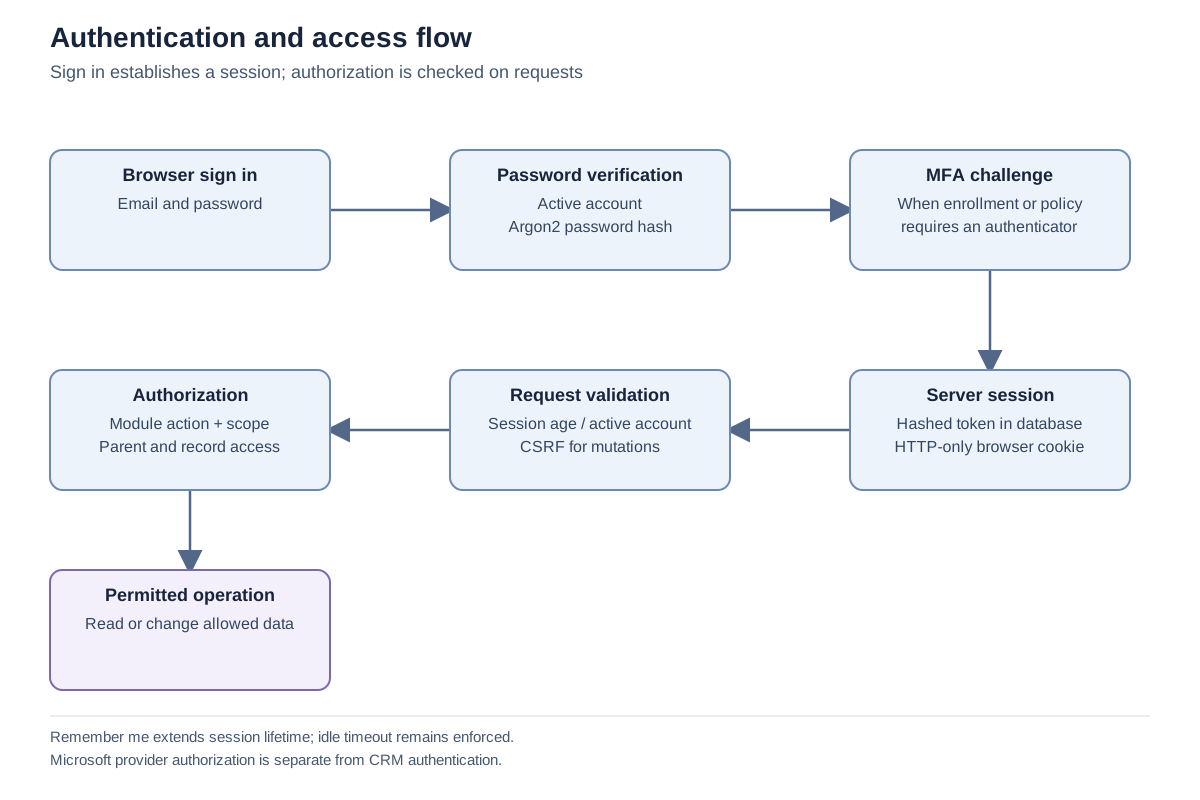
Important notes
Section titled “Important notes”-
A session cookie does not carry permanent permission grants. The server reloads the user and effective access policy.
-
Mutating browser requests require the matching CSRF token in addition to the session.
-
A connected Microsoft mailbox is a separate delegated identity. Disconnection of Microsoft does not itself remove the CRM password account.
-
Do not send passwords, authenticator seeds, recovery codes or reset links to support.
Troubleshooting
Section titled “Troubleshooting”-
Invalid email or password: confirm the address and account activity with the administrator, then use the supported reset path.
-
Session expired: sign in again; repeated expiry requires review of inactivity, configured lifetime and browser cookie handling.
Related articles
Section titled “Related articles”Search the guides or talk to the ZBIX team.


Software products, application engineering and IT services from Zbix Technologies.
Visit our company website ↗