Deploy a self-hosted CRM server on AWS EC2
Overview
Section titled “Overview”AWS EC2 can host either the Ubuntu distribution or the native Windows Server package. The application remains self-hosted: the operating team is responsible for the instance, network exposure, certificates, updates, storage and recoverability. The available Linux deployment report records a v1.2.0 installation on Ubuntu 26.04 amd64.
Purpose
Section titled “Purpose”Combine the appropriate package installation with an explicit cloud networking and operations plan. This guide does not create AWS resources or imply that a complete managed SaaS control plane is included.
Prerequisites
Section titled “Prerequisites”-
An approved AWS account and operator permissions for the intended infrastructure.
-
A selected Linux or Windows package, release manifest and qualified operating-system image.
-
Approved network, DNS, storage, recovery and monitoring designs.
-
A controlled administration path and a maintenance/change owner.
Procedure
Section titled “Procedure”-
Select the operating system and architecture before selecting the package. For the Linux path, the recorded acceptance configuration used a t3a.large with two vCPU and 8 GiB advertised RAM. Treat it as a documented test/deployment configuration, not a universal capacity guarantee or mandatory instance family.
-
Plan persistent storage for the database, private files, image/runtime footprint, temporary recovery work and retention. Confirm the cloud storage protection and performance settings through the cloud team rather than inferring them from application health.
-
Provide a stable service endpoint and prepare a DNS name such as crm.example.com. Restrict SSH or RDP to the approved administrator path. Expose only the selected gateway’s public ports; do not expose PostgreSQL, the internal API or the Linux loopback web port.
-
Transfer the approved release package through the organization’s controlled process and verify its outer SHA256 and inner manifest where applicable. The Linux distribution loads bundled application images; it does not require compiling the CRM source on the instance.
-
Follow the complete Linux installation guide for Ubuntu, or the native Windows guide for Windows. Keep their directory layouts, service controls and gateway requirements distinct. Do not mix a Windows Server Manager procedure with Linux Compose commands.
-
Complete the approved DNS and certificate configuration. On the Linux topology, host Nginx terminates HTTPS and forwards to the loopback web container. On native Windows, the bundled Caddy gateway serves the configured public/private names. Validate trusted HTTPS from the intended user network.
-
Check release identity, migration, readiness and service health. Verify that the worker is processing and that unauthenticated access is denied where authentication is required. Complete administrator bootstrap and license activation through the relevant package workflow.
-
Create a recovery point, independently verify it and perform an isolated restore test. Protect required keys separately and arrange approved off-instance retention. A backup on the same EC2 instance is not protection against loss of that instance.
-
Configure independent monitoring for readiness, worker heartbeat/queues, storage, certificate renewal and recovery failures. For burstable instances include CPU-credit monitoring. Record alert ownership and conduct an operational handover before increasing workload.
Expected result
Section titled “Expected result”The selected self-hosted package operates behind trusted HTTPS on the approved cloud network, with identified owners for security, capacity, backup and maintenance.
Screenshots and diagrams
Section titled “Screenshots and diagrams”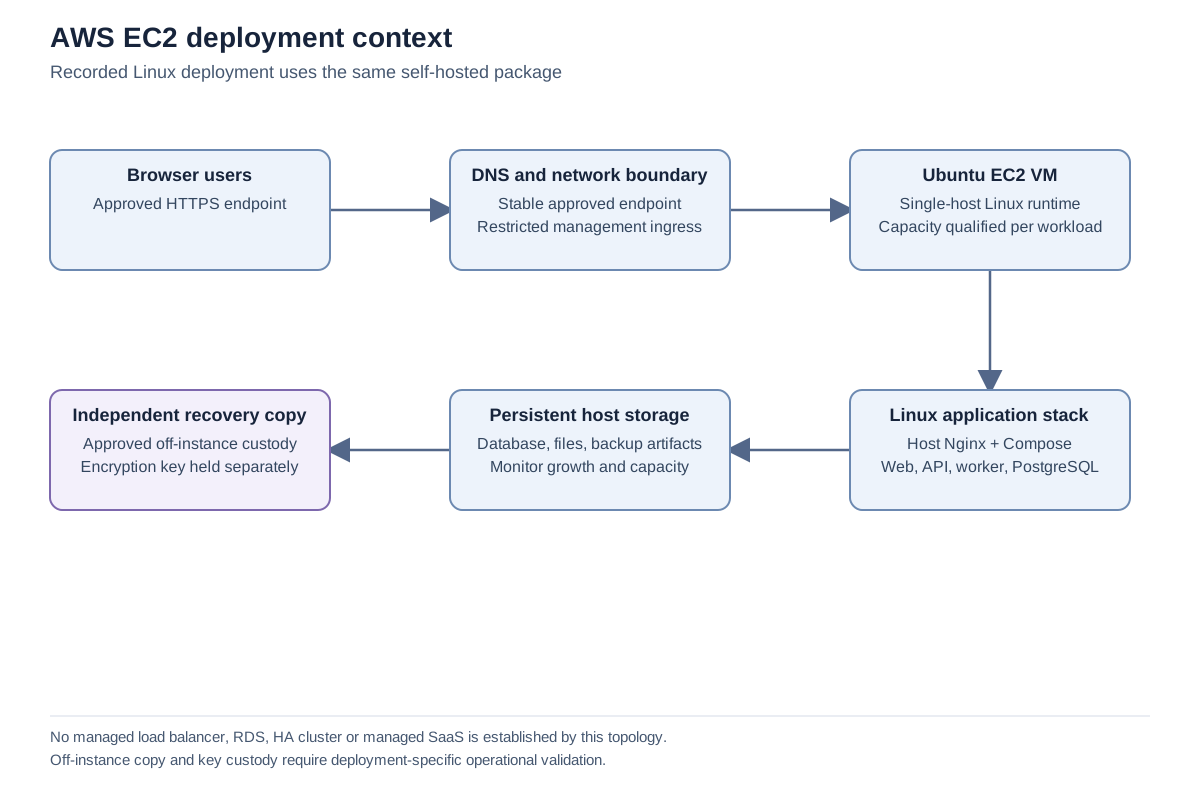
Important notes
Section titled “Important notes”-
The dated v1.2 deployment record is evidence of one running installation and one qualified upgrade/recovery preparation. It is not a fresh cloud audit performed for this guide.
-
This guide makes no assertion about a particular AWS account, region, instance identifier, storage encryption setting or current security group.
-
Load balancers and alternative TLS termination require a separately reviewed origin, proxy and certificate design. They are not interchangeable with the direct gateway procedure.
-
Do not describe EC2 hosting alone as high availability, managed multi-tenancy or a service-level guarantee.
Troubleshooting
Section titled “Troubleshooting”-
If HTTPS fails while local readiness succeeds, check DNS, gateway configuration, certificate validation and the relevant network rules.
-
If the instance is healthy but background work is delayed, inspect worker heartbeat and resource pressure, including burstable CPU credits.
-
If off-instance recovery has not been tested, keep that qualification open even when an artifact upload succeeds.
-
Escalate with package version, selected OS, failed layer, time and sanitized diagnostics. Do not share cloud credentials or private infrastructure identifiers in public support posts.
Related articles
Section titled “Related articles”Search the guides or talk to the ZBIX team.


Software products, application engineering and IT services from Zbix Technologies.
Visit our company website ↗